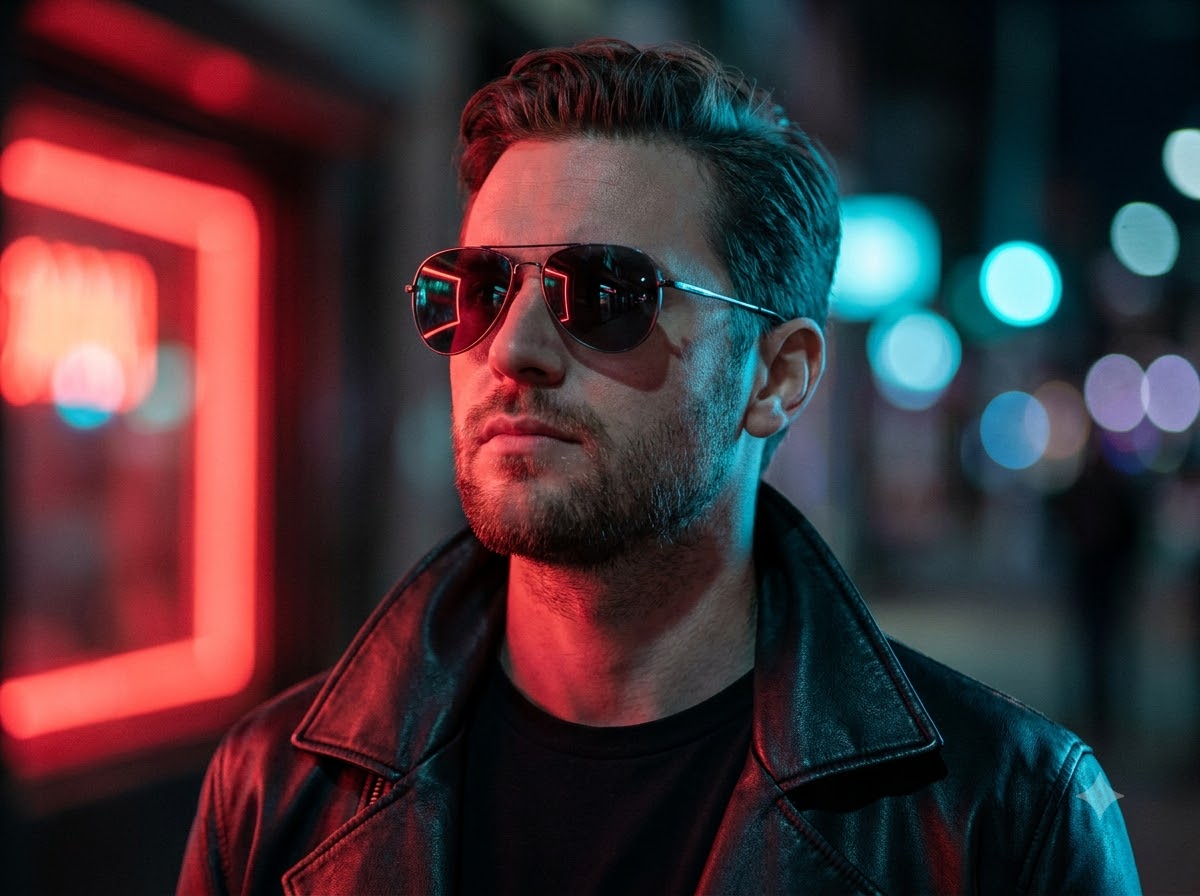
NEON RED-CYAN URBAN PORTRAIT
Category: Portraits | Optimized For: Nano Banana Pro | Aspect Ratio: 4:5
Copy-Paste AI Photo Editing Prompt
Edit Image 1 into a photorealistic neon-lit urban fashion portrait. Use Image 2 only for composition, lighting, wardrobe, and atmosphere. Ignore its text and graphic overlays.

IDENTITY
Preserve the exact person from Image 1: facial structure, age, skin tone, hairstyle, and existing facial hair. Do not copy the reference model’s identity, shave the head, or add a beard unless those features already exist in Image 1.

POSE AND FRAMING
Create a vertical 2:3, chest-up portrait. Turn the face slightly toward the left side of the image, with the chin subtly raised and a calm, confident, unsmiling expression. Keep the entire head visible and let the shoulders fill the lower frame. Shoot at eye level.

WARDROBE
Dress the person in a black leather jacket with a broad folded collar over a plain black crew-neck shirt. Show realistic leather grain, seams, folds, and restrained reflections. Add thin metal-framed aviator sunglasses with dark tinted lenses reflecting nearby neon lights.

LIGHTING — MATCH THE REFERENCE
Use strong two-tone lighting:
• Saturated red light from the left side of the image illuminates the left forehead, cheek, beard area, neck, and jacket.
• Cool cyan-blue light from the right illuminates the right scalp or hair, temple, ear, cheek edge, and shoulder.
Let the colors meet naturally across the face, with deep shadows around the nose, beneath the glasses, and under the jaw. Keep the skin realistic rather than glowing or metallic.

BACKGROUND
Place the person on an urban street at night. Behind them on the left, include a large, heavily blurred red rectangular neon panel with no readable lettering. On the right, show scattered cyan, blue, and muted violet circular bokeh lights. Keep the surroundings dark and indistinct, with no sharp buildings or distracting objects.

PHOTOGRAPHIC FINISH
Simulate an 85mm portrait lens at f/1.8: sharp facial texture and jacket detail, very shallow depth of field, creamy background blur. Rich red-and-cyan colors, deep blacks, subtle film grain, natural skin pores, and realistic lens reflections. Cinematic night photography, not illustration or CGI.

Remove every reference overlay. No “/prompt” heading, paragraphs, boxes, usernames, captions, readable signs, logos, or watermarks. Final output: only the photographic portrait.
How to Use This Prompt in Google Gemini & ChatGPT
- Copy the exact prompt formula above.
- Open Google Gemini (Nano Banana Pro) or ChatGPT Vision and upload your reference portrait if required.
- Paste the prompt and adjust subject clothing or lighting details as desired.