FICTIONAL SURVEILLANCE-THRILLER STREET PORTRAIT
Category: Portraits | Optimized For: Google Gemini | Aspect Ratio: 4:5
Copy-Paste AI Photo Editing Prompt
Use the uploaded identity image as the exact facial and physical reference for the central adult male and his inset portrait. Preserve his recognizable facial structure, eye and eyebrow shape where visible, nose, lips, jawline, cheek structure, skin tone translated naturally into monochrome, hairstyle, hairline, facial-hair pattern, apparent age, body type, and natural proportions.

Use the uploaded image only as a visual identity reference. Do not infer, display, or invent real personal information, protected characteristics, biometric measurements, criminal records, addresses, contact information, or other private data. Do not present the scene as authentic surveillance footage or claim that the person is genuinely being monitored.

Use the supplied composition reference only for the elevated viewpoint, black-and-white city scene, centered walking character, moving crowd, green interface graphics, inset portrait panel, and cinematic surveillance aesthetic. Do not copy any visible person, identity, interface text, timestamp, store name, watermark, branding, or exact layout from the reference.

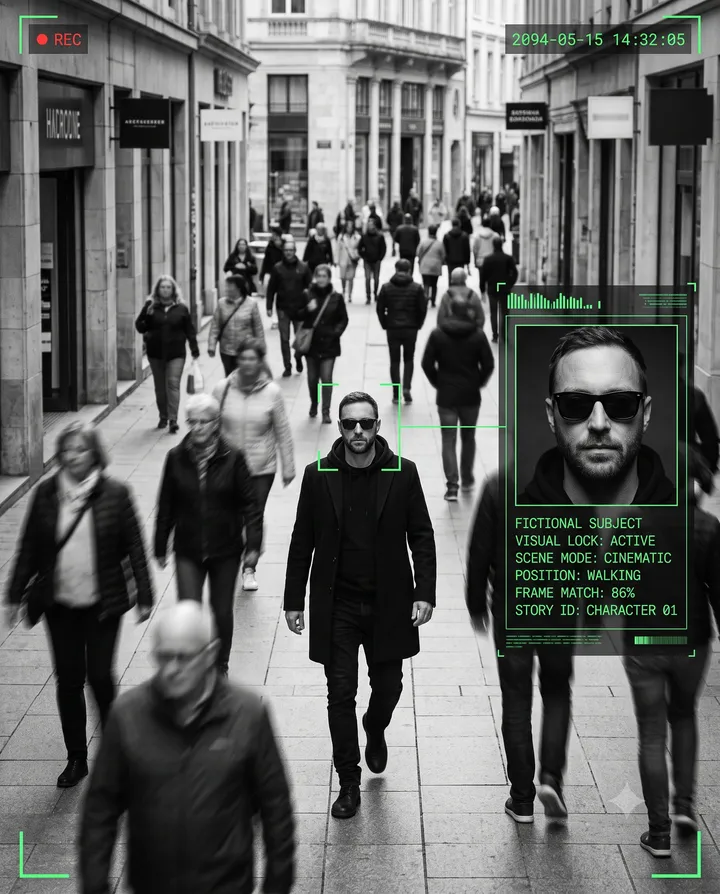
Create an ultra-realistic fictional science-fiction thriller image showing the uploaded adult male walking through a crowded pedestrian street while a clearly decorative, nonfunctional surveillance-style interface highlights him as a narrative movie character.

CENTRAL CHARACTER
Dress him in an unbranded black overcoat, black high-neck shirt, tailored dark trousers, polished dark shoes, and round black sunglasses with restrained street reflections. Preserve his hairstyle and facial hair from the uploaded identity image. If styling adjustments are necessary, keep them minimal and consistent with his original appearance.

Give him a serious but calm expression. Position him near the lower-middle center of the composition, walking directly toward the camera with a confident posture. Show his arms moving naturally at his sides and maintain believable walking anatomy.

Keep him as the only person rendered in consistently sharp focus. Preserve recognizable facial geometry despite the sunglasses through the visible brow, nose, cheeks, lips, jawline, hairline, hairstyle, facial hair, and other unobstructed characteristics.

CROWD AND STREET
Surround him with approximately thirty to forty original fictional adult pedestrians. Give the crowd varied heights, body types, hairstyles, clothing, and movement directions, but keep all background faces anonymous and indistinct.

Apply directional long-exposure motion blur to the surrounding pedestrians. Place several heavily blurred figures close to the camera along the bottom and side edges to create depth. Add additional figures behind the central subject with progressively softer detail.

Do not duplicate the uploaded subject’s face or appearance anywhere in the crowd. Avoid cloned pedestrians, repeated clothing, fused bodies, floating limbs, transparent torsos, or recognizable background identities.

Set the scene on a wide anonymous pedestrian shopping street containing original storefronts, windows, streetlights, stone paving, and upper-story architecture. Keep signs blank, abstract, cropped, or unreadable. Do not include real business names, brands, addresses, landmarks, license plates, transit information, or location-specific details.

CAMERA PERSPECTIVE
Photograph the scene from an elevated viewpoint, resembling a fictional overhead security-camera angle or high balcony. Use a gentle downward perspective while keeping the central man’s face and body readable.

Use a professional 50mm compressed-perspective aesthetic rather than extreme wide-angle distortion. Keep the central subject sharp, the closest moving crowd heavily blurred, and the distant crowd progressively softer.

Create an approximately 1/10-second slow-shutter appearance with the central character stabilized. Do not apply motion blur, transparency, ghosting, or double edges to his face or body.

DECORATIVE FICTIONAL INTERFACE
Add one thin phosphorescent-green rectangular frame around the central man’s head and shoulders. Keep the frame slightly separated from his face and connect it with a fine green line to a larger information panel positioned on the right side.

Inside the right-side panel, include one close-up portrait of the same uploaded man. Preserve exactly the same face, hairstyle, facial hair, sunglasses, age, and expression as the walking figure. Present the inset as a repeated cinematic portrait—not a real biometric scan.

Add clearly fictional decorative labels using only the following text:

FICTIONAL SUBJECT
VISUAL LOCK: ACTIVE
SCENE MODE: CINEMATIC
POSITION: WALKING
FRAME MATCH: 86%
STORY ID: CHARACTER 01
Do not add a real name, demographic category, biometric score, address, phone number, social-media account, criminal allegation, threat classification, medical information, or protected-trait inference.

In one upper corner, add a small red recording-style indicator:

● REC

Add the invented future timestamp:

2094-05-15 14:32:05

Include thin corner markers, subtle scan lines, geometric brackets, small abstract data bars, and restrained technical decoration. Keep every overlay clearly fictional, decorative, and nonfunctional. Do not imitate the exact interface of real police, government, military, security, or commercial facial-recognition software.

If accurate interface text cannot be rendered, keep only the green tracking frame, connector line, inset portrait, red recording dot, and clean blank data fields. Do not generate random words or malformed technical information.

COLOR AND LIGHTING
Render the street, architecture, central subject, and crowd in high-contrast black and white. Preserve deep blacks, silver midtones, soft white highlights, realistic skin tones in grayscale, and detailed pavement texture.

Render the decorative interface in restrained phosphorescent green with one small red recording indicator. Add subtle glow around the graphic elements without covering the central subject’s face or obscuring the crowd.

Use diffused overcast daylight with gentle directional shadows. Add fine film grain, mild fictional security-camera texture, restrained vignette, subtle digital noise, and slight highlight bloom while maintaining premium cinematic quality.

The final image should communicate anonymity, observation, identity, technology, tension, and the sensation of one individual becoming visually isolated within a moving crowd. It must read unmistakably as fictional thriller artwork—not authentic surveillance evidence or operational tracking.

Professional elevated urban photography, 50mm lens aesthetic, approximately 1/10-second motion blur with central-subject stabilization, sharp facial focus, high dynamic range, realistic crowd movement, cinematic monochrome grading, crisp decorative interface design, and Ultra-HD 8K quality.

Strong identity fidelity to the uploaded image; exactly one central walking subject and one matching inset portrait; no identity drift, face replacement, inconsistent inset identity, duplicated central character in the crowd, celebrity transformation, real-person tracking claims, real biometric data, actual addresses, criminal labels, protected-trait inference, police or government logos, operational facial-recognition design, identifiable crowd faces, malformed bodies, extra limbs, random interface text, QR codes, social-media information, real store names, trademarks, watermarks, or application-brand elements. Vertical 4:5 aspect ratio.
How to Use This Prompt in Google Gemini & ChatGPT
- Copy the exact prompt formula above.
- Open Google Gemini (Nano Banana Pro) or ChatGPT Vision and upload your reference portrait if required.
- Paste the prompt and adjust subject clothing or lighting details as desired.