ANGEL AND DEVIL WHISPERING INTO A MAN'S EARS
Category: Portraits | Optimized For: Nano Banana Pro | Aspect Ratio: 4:5
Copy-Paste AI Photo Editing Prompt
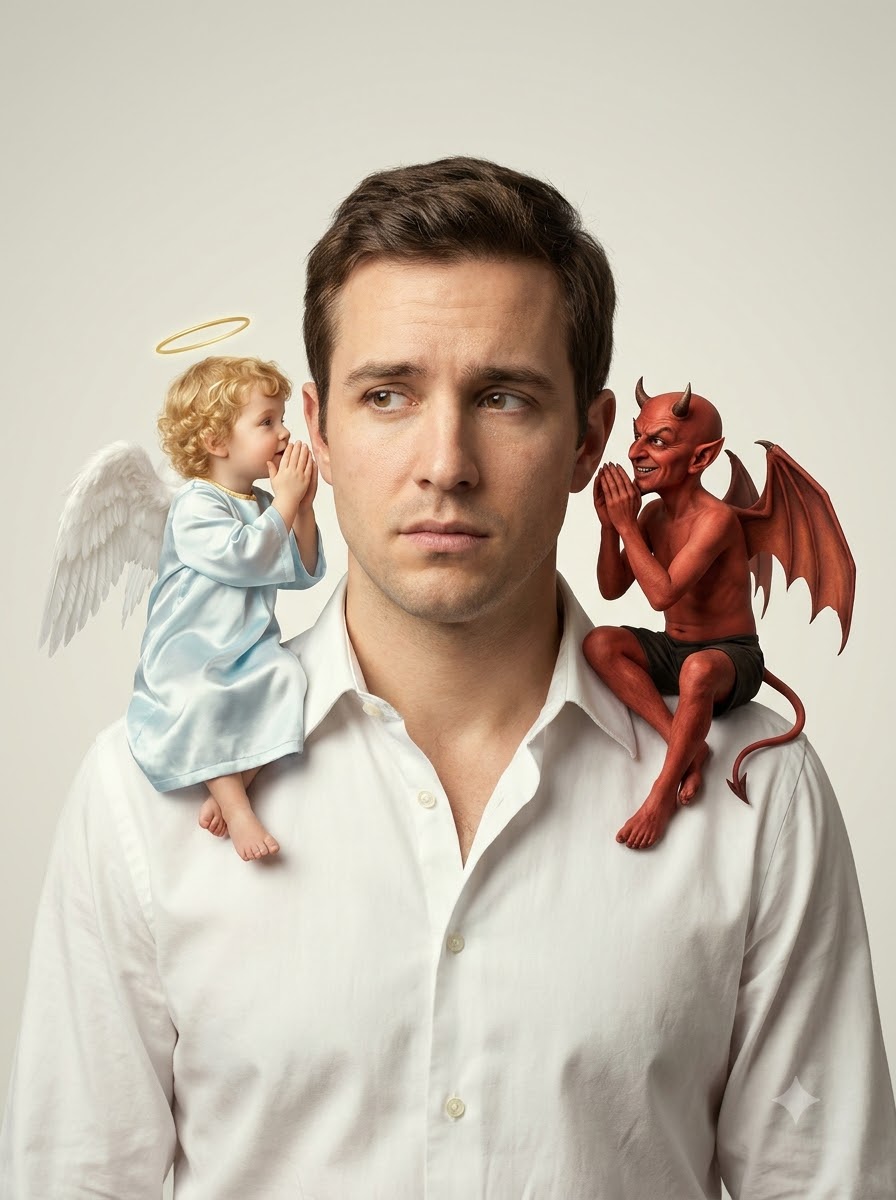
Create a photorealistic surreal portrait of an adult man with a tiny angel on one shoulder and a tiny red devil on the opposite shoulder. Both miniature fantasy characters lean toward his ears as if whispering conflicting advice.

CENTRAL MAN:
A young adult man with short, thick, neatly styled dark-brown hair, clean-shaven skin, and a white button-down shirt with the collar open. His expression is thoughtful and uncertain.

His head is turned slightly sideways, and his eyes look toward the left with a subtle expression of confusion or contemplation. His shoulders remain level, and his face occupies the central upper portion of the portrait.

Maintain natural facial anatomy, realistic skin pores, accurate hair strands, and believable shirt folds.

ANGEL ON THE LEFT:
A tiny childlike cherub sits on the man's left shoulder. The cherub has soft golden-blonde curls, delicate white feathered wings, a thin metallic gold halo hovering above the head, and a pale icy-blue satin robe with fine gold trim.

The angel leans toward the man's left ear, cupping both hands near its mouth as if whispering. Its face is expressive and focused, with an innocent, thoughtful appearance.

The wings have many individually layered white feathers with subtle beige-gray shadows. The robe has convincing folds and a soft satin sheen.

DEVIL ON THE RIGHT:
A miniature red-skinned devil sits on the man's right shoulder. It has small curved horns, pointed ears, tiny bat-like wings, a thin curved tail ending in an arrowhead, and expressive amber eyes.

The devil wears simple dark shorts. It leans toward the man's right ear, cupping both hands around its mouth to whisper. Its face conveys sly mischievousness rather than aggression.

The skin has realistic reddish texture and subtle highlights. The horns, wings, and tail must have coherent three-dimensional anatomy.

SIZE AND INTERACTION:
The angel and devil are substantially smaller than the man, each approximately the height of his head or slightly less. Both sit physically on his shoulders, with believable contact, body weight, and shadows.

Their hands must be near the man's ears, but neither character should cover his eyes or facial features.

LIGHTING:
Soft, even studio illumination with a slightly warm key light from the front-left. The man receives natural skin tones and subtle facial shadows. Gentle highlights define the angel's white feathers and pale-blue satin, while controlled warm light reveals the devil's red skin and leathery wings.

BACKGROUND:
A clean, pale ivory-gray studio background with very subtle tonal variation. No scenery, furniture, or distracting objects.

COMPOSITION:
Vertical 2:3 portrait, framed from the man's upper chest to above the angel's halo. Center the man with the angel on the viewer-left and devil on the viewer-right. Keep both miniature characters fully visible.

STYLE:
Premium photorealistic composite, realistic human portrait, high-quality 3D fantasy characters, detailed skin and fabric, balanced shadows, and clean editorial finish.

STRICT IMAGE-ONLY OUTPUT:
No text, captions, symbols, logos, watermarks, borders, or graphic overlays.

NEGATIVE PROMPT:
Extra fantasy characters, duplicated wings, malformed horns, detached tail, angel or devil floating away from the shoulders, oversized creatures, distorted hands, unnatural human eyes, overly cartoonish human skin, text, watermark, or logo.

FINAL RESULT:
A clean, photorealistic surreal portrait illustrating the classic angel-versus-devil concept through two tiny characters whispering into a man's ears.
Mastering the Angel and Devil AI Photo Prompt: Optical Breakdown and Setup Guide
If you want to generate a surreal character composition using an angel and devil AI photo prompt, this guide breaks down each element of the visual formula. In modern ai photo editing prompts and chatgpt photo editing prompts, rendering two distinct miniature figures seated on a subject's shoulders is a captivating portrait concept. This gemini ai photo editing prompt leverages structured prompt engineering to balance symbolic narrative with clean studio aesthetics, defining character scale, contact shadows, and lighting contrast.
1. Visual Concept: Duality in Studio Portraiture
The conscience split between virtue and temptation—depicted as a miniature angel on one shoulder and a devil on the other—presents common rendering hurdles. Vision models frequently merge both characters, fuse wings, or alter facial likeness. In this calibrated prompt, the man remains the central anchor in a vertical upper-chest crop with an inquisitive, slightly off-camera gaze.
2. Miniature Scale and Shoulder Placement
Without precise scale definitions, miniature figures often float awkwardly or appear unnaturally large. In this composition, each character is calibrated to roughly one-quarter of the man's head height. The angel rests with believable physical contact on the man's left shoulder, while the devil balances on the right, both whispering toward his ears without covering his eyes or jawline.
3. Costume Details, Wings, and Anatomical Textures
The Angel (Left Shoulder)
Features layered white plumage with feather separation, soft ivory shadows, and a pale-blue draped satin tunic. A subtle warm halo hovers slightly above its head.
The Devil (Right Shoulder)
Features rich crimson skin texture with anatomical creases, bat-like wings, tiny curved horns, and amber eyes conveying playful persuasion rather than aggression.
4. Lighting and Optical Styling (Optional Creative Direction)
While optical specs serve as creative directions rather than guaranteed settings, specifying studio lighting establishes mood. An optional 5600K diffused key light from the front-left illuminates natural skin tones and white feathers, while an optional 3200K warm rim light from the right outlines crimson contours. An 85mm portrait simulation provides pleasing facial compression.
5. Step-by-Step Guide for Google Gemini and Nano Banana
- Copy Recipe: Click 'Copy Prompt' on the card above.
- Open Tool: Go to Google Gemini. When available in supported models (such as Nano Banana or Gemini Advanced), access image generation via chat. See the official Google Gemini image guide.
- Upload Reference: If transforming your own portrait, attach a well-lit photo and paste the prompt.
- Review Output: Check character proportions and facial consistency.
6. Step-by-Step Guide for ChatGPT Images
- Open ChatGPT: Log in to ChatGPT and start a fresh chat session.
- Enable Vision: Consult OpenAI's official ChatGPT Images help for current features and prompt guidelines.
- Attach Reference (Optional): Upload a clear headshot if styling an existing person.
- Execute & Refine: Paste the formula. Request iterative adjustments for figure height or lighting as needed.
Please note: feature availability, interface labels, model versions, and generative outputs may vary depending on account tier, regional rollout, and platform updates.
7. Practical Prompt Customisation Tips
- Subject Expression: Shift from contemplative to amused or stoic by updating the subject line.
- Wardrobe: Swap the dark shirt for a charcoal suit, linen shirt, or vintage jacket.
- Tonal Contrast: Prompt for black-and-white noir or chiaroscuro shadows for dramatic flair.
8. Troubleshooting Common Issues
Floating Figures: Add: “Ensure miniature figures cast believable contact shadows directly onto shoulders and shirt collar.”
Altered Facial Features: Remind the model: “Preserve the subject's original facial geometry, skin tone, and eye color without smoothing or re-stylising.”
Unequal Character Height: Specify: “Keep angel and devil characters symmetrical in scale, each one-quarter the height of the subject's head.”
9. Frequently Asked Questions
Can I use this prompt with my own selfie or photo?
Yes. You can upload a high-resolution photo as a visual reference. While vision tools do not guarantee perfect identity cloning, explicit preservation prompts help maintain likeness.
Do I need paid subscriptions to generate this portrait?
Both Google Gemini and ChatGPT offer free tiers that support image creation, though quota limits and premium model access vary by account level and region.
Why do the angel and devil sometimes blend into one character?
Diffusion models can conflate dual entities described in a single paragraph. Dividing descriptions into explicit left and right character blocks prevents attribute bleeding.
Can I change the studio background to an outdoor setting?
Yes. You can replace the ivory studio backdrop with a library or night cityscape, though plain backgrounds ensure cleaner character silhouette separation.
Explore More AI Photo Prompt Styles
Looking for other popular concepts beyond surreal duality? Whether you are searching for a trending ai photo prompt to experiment with, crafting a romantic scene with a gemini couple photo prompt or classic ai couple photo prompt, styling traditional Indian attire with a gemini saree prompt or elegant ai saree photo prompt, or celebrating a milestone using a creative ai birthday photo prompt, our prompt catalog covers diverse genres to inspire your next generative visual project.
Related AI Photo Prompts
- Emotional Clown Portrait in a Vintage Mirror: Explore theatrical makeup, antiqued glass reflections, and moody dressing-room lighting.
- Woman Under a Floating Golden Halo: A minimalist symbolic portrait featuring celestial lighting and high-fashion styling.
- Portraits Category Directory: Browse dozens of studio and cinematic portrait recipes.
- Explore All Prompt Categories: Discover copy-paste prompts across all 20 curated themes in our library.