VINTAGE SOVIET NEW YEAR GREETING CARD
Category: Portraits | Optimized For: Google Gemini | Aspect Ratio: 4:5
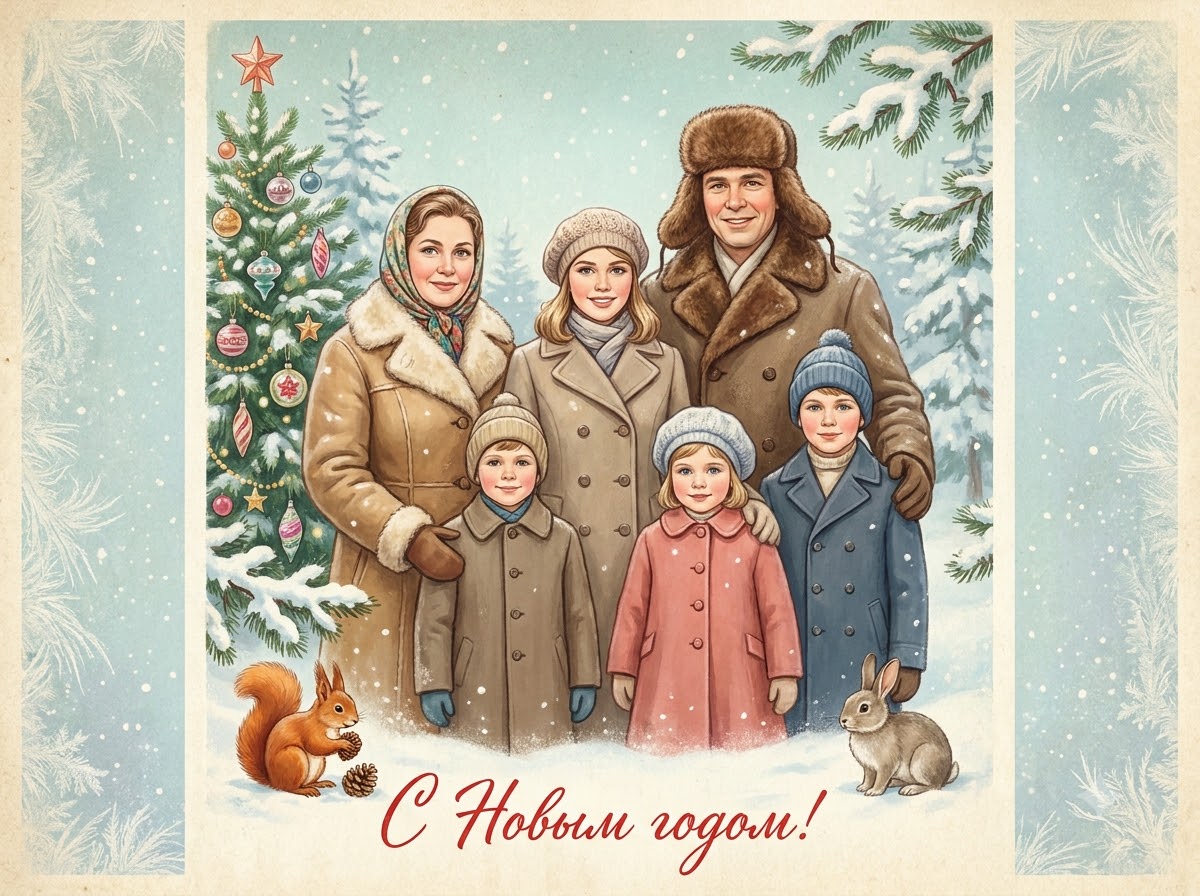
Copy-Paste AI Photo Editing Prompt
Create a vintage New Year greeting card featuring the people from the uploaded photograph. Vertical 9:16 format.

Use the style of Soviet fairy-tale postcards from the 1950s–1970s: soft painterly illustration, delicate hand-painted details, and a warm, cozy atmosphere.

Keep the people at the center of the composition. Preserve each person’s recognizable facial likeness, facial proportions, age, and expression as closely as possible to the original photo. Render their faces naturally within the illustrated style, without caricature or exaggerated features.

Replace modern clothing with vintage Soviet winter outfits appropriate to each person:
— Adults wear fluffy fur hats, wool winter coats, or sheepskin coats.
— Girls wear 1960s–1970s-style A-line wool coats with double-breasted buttons, knitted berets, and scarves in warm vintage colors.
— Boys wear straight-cut wool coats or winter jackets with patch pockets, knitted hats, and scarves in muted earthy colors.
Include only the people present in the uploaded photo.

Surround them with a magical snowy winter scene. Place a New Year tree on the left, decorated with simple vintage glass ornaments, colorful baubles, pinecones, and a star. Frame the composition with snow-covered evergreen branches. Add charming woodland animals, such as a red squirrel holding a pinecone and a small rabbit, painted in a gentle storybook style.

Include softly falling snow, intricate frost patterns, and a pale icy-blue background. Use a soft pastel palette of cream, snowy white, muted blue, evergreen, and warm brown. Add aged-paper texture, subtle printed grain, and slightly faded colors, while keeping the faces clear and recognizable.

At the bottom, write the exact Russian greeting “С Новым годом!” in elegant, flowing red handwritten calligraphy, styled like a vintage Soviet postcard.

The overall mood is festive, nostalgic, tender, and warmly enchanting. No promotional text, social-media handles, logos, or watermarks. 4:5
How to Use This Prompt in Google Gemini & ChatGPT
- Copy the exact prompt formula above.
- Open Google Gemini (Nano Banana Pro) or ChatGPT Vision and upload your reference portrait if required.
- Paste the prompt and adjust subject clothing or lighting details as desired.