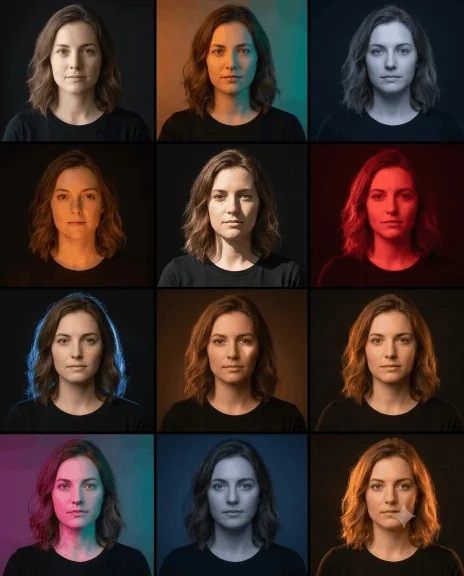
TWELVE-LIGHTING STUDIO PORTRAIT GRID
Category: Portraits | Optimized For: Gemini | Aspect Ratio: 4:5
Copy-Paste AI Photo Editing Prompt
Use the uploaded image as the sole identity and appearance reference. Create an ultra-realistic grid of 12 studio portraits featuring the exact same adult person from the uploaded photograph.

Format the final image as a vertical 4:5 canvas, arranged in exactly 3 columns and 4 rows.

The 12 panels must depict the same person with identical facial identity, hairstyle, expression, head position, body position, camera angle, crop, clothing, and background placement. Treat the portrait as one locked photograph duplicated across the grid, with only the lighting setup changing from panel to panel.

Do not recreate the person as 12 slightly different individuals. Do not introduce facial drift, expression changes, pose changes, or hairstyle changes.

STRICT IDENTITY PRESERVATION
Accurately preserve from the uploaded photograph:

Exact facial structure and proportions
Apparent adult age
Natural skin tone and undertone
Eye shape, spacing, color, and gaze
Eyebrow shape, density, and placement
Exact nose shape and proportions
Lip shape, fullness, and natural asymmetry
Cheekbones, jawline, chin, and ears
Natural hairline
Exact hairstyle, length, color, texture, and parting
Facial hair, makeup, and distinguishing features, where applicable
Natural facial asymmetry and skin details
Keep the person’s face equally recognizable in every panel. Do not beautify, idealize, age, de-age, masculinize, feminize, or otherwise reinterpret the subject.

If the uploaded photograph contains multiple people, use only the most prominent central adult subject. Do not combine facial features from different people.

LOCKED PORTRAIT REQUIREMENTS
Use the same portrait setup in every panel:

Front-facing head-and-shoulders composition
Head positioned upright and centered
Eyes looking directly into the camera
Identical eye direction
Identical facial expression
Identical mouth position
Identical head angle
Identical shoulder position
Identical posture
Identical hairstyle and individual hair arrangement
Identical crop and subject scale
Identical camera distance and focal length
Identical plain black T-shirt
Identical dark studio background structure
Only the direction, intensity, color, softness, and contrast of the light may change.

The person must not appear to move between panels. Hair strands, clothing folds, facial expression, and head position should remain visually locked.

EXPRESSION
Preserve the expression shown in the uploaded reference whenever possible.

If the reference expression cannot be used cleanly in a frontal portrait, use a restrained neutral expression while preserving identity:

Lips naturally closed
Jaw relaxed
Brows at rest
Direct eye contact
Calm, composed mood
No smile unless present in the reference
No exaggerated intensity or theatrical expression
Once established, use the exact same expression in all 12 panels.

HAIRSTYLE
Preserve the hairstyle from the uploaded image exactly:

Same hair length
Same color
Same texture
Same parting
Same volume
Same hairline
Same fringe or loose strands
Same placement around the forehead, ears, and shoulders
Do not restyle the hair between panels. Lighting may change the apparent highlights and shadow color, but the physical arrangement of the hair must remain identical.

CLOTHING
Dress the person in the same plain black crew-neck T-shirt in every panel.

The shirt should have:

Matte black fabric
Clean neckline
Natural fabric texture
Identical folds in every panel
No logos
No lettering
No patterns
No jewelry or accessories
The clothing must not change color, shape, neckline, texture, or fit between panels. Colored lighting may create realistic reflections, but the actual garment remains black.

GRID LAYOUT
Arrange the portraits in exactly:

3 equal columns
4 equal rows
12 total panels
Use narrow, even black gaps between panels. Keep all panel dimensions identical.

Maintain:

Equal margins
Straight dividers
Consistent panel spacing
Perfect row and column alignment
No overlapping frames
No missing or duplicated panels
No large border surrounding the grid
No text beneath or above any panel
Each portrait should fill its panel consistently. Use the same head size and eye-line height throughout the grid.

LIGHTING MAP
Follow this exact lighting order from left to right and top to bottom.

Row 1, Column 1 — Soft Window Daylight
Use soft natural daylight entering from one side.

Create:

Gentle directional illumination
Soft transitions across the face
Natural skin tones
Delicate catchlights
Mild shadows on the opposite cheek
A quiet editorial atmosphere
The effect should resemble diffused daylight from a large nearby window.

Row 1, Column 2 — Teal and Orange Split Lighting
Illuminate one side of the face with warm orange light and the opposite side with cool teal-cyan light.

Create:

Balanced complementary colors
Warm orange highlights on one cheek
Cool cyan shadows on the opposite side
Realistic color blending across the nose and forehead
Controlled saturation
Clear facial detail on both sides
Do not create a perfectly artificial line down the center of the face.

Row 1, Column 3 — Pale-Blue Moonlight
Use cool pale-blue light from above against a dark navy background.

Create:

Cool highlights on the forehead, nose, and cheekbones
Soft shadows beneath the eyebrows and chin
A faint blue rim around the hair
Deep navy background tones
Quiet nighttime atmosphere
Keep the eyes visible and naturally illuminated.

Row 2, Column 1 — Firelight From Below
Use warm flickering orange firelight rising from below the face.

Create:

Warm amber-orange illumination beneath the chin and cheeks
Irregular but believable intensity
Deep shadows above the cheekbones and brows
Subtle red warmth in the skin
Controlled cinematic drama
The effect should resemble reflected firelight, not flames touching the subject. Do not add a visible fire source.

Row 2, Column 2 — Hard Direct Sunlight
Use harsh direct sunlight with crisp, high-contrast shadows.

Create:

Bright neutral-to-warm highlights
Sharp shadow edges
Strong facial structure
Realistic sunlight falloff
Controlled highlight detail
Slightly sunlit background separation
Do not blow out the skin or lose detail in the illuminated areas.

Row 2, Column 3 — Red Neon Side Light
Use strong saturated red neon light from one side while allowing the opposite side of the face to fall into deep shadow.

Create:

Crimson highlights along one side of the face
Red reflections in the visible eye
Subtle red edges on the hair
Deep but detailed shadows
Dark burgundy-to-black background tones
Do not turn the entire face solid red.

Row 3, Column 1 — Blue Rim Backlight
Place a strong cool-blue light behind the subject.

Use it to outline:

Hair edges
Ears
Jawline
Neck
Shoulders
Keep the front of the face dimly illuminated by a restrained neutral fill so the identity remains visible. The rim light should not create a glowing outline detached from the subject.

Row 3, Column 2 — Warm Tungsten Interior Light
Use warm brown-amber tungsten lighting resembling a dim interior lamp.

Create:

Warm skin highlights
Soft amber shadows
Muted brown background tones
Gentle falloff
A quiet, intimate atmosphere
Slight analog warmth
Keep the color grading refined rather than excessively yellow.

Row 3, Column 3 — Classic Rembrandt Lighting
Use classic Rembrandt portrait lighting from approximately 45 degrees above and to one side.

Create:

A clearly defined but natural triangle of light beneath the eye on the shadow side
Sculpted cheekbones
Controlled nose shadow
Soft light on the forehead and near cheek
Deep but detailed opposite-side shadows
Traditional fine-art portrait mood
The light triangle must arise naturally from the nose and cheek shadows rather than appearing painted onto the face.

Row 4, Column 1 — Magenta and Cyan Lighting
Illuminate one side of the face with magenta-pink light and the other with cyan-blue light.

Create:

Strong complementary color separation
Smooth color transitions
Controlled neon reflections
Detailed skin texture beneath the colors
Clear eyes and facial structure
Avoid clipping the magenta or cyan color channels.

Row 4, Column 2 — Soft Dim Blue Light
Use soft, dim, even blue illumination.

Create:

Low-contrast facial modeling
Muted blue-gray skin reflections
A dark navy studio background
Quiet shadow detail
Soft catchlights
Calm nighttime mood
The panel should remain readable and detailed rather than underexposed.

Row 4, Column 3 — Golden-Hour Side Light
Use warm golden-hour sunset light entering from one side.

Create:

Golden highlights on the cheek and forehead
Amber glow around the hair
Soft warm reflections in the eyes
Gentle elongated shadows
Subtle orange rim lighting
Natural sunset warmth
Keep the skin realistic and avoid an excessive orange filter.

BACKGROUND
Use a minimal dark studio background in every panel.

The background may shift slightly in color according to the lighting setup, but its physical texture and placement must remain consistent.

Use variations of:

Charcoal black
Deep navy
Muted burgundy
Dark brown
Cool blue-gray
Do not add visible objects, scenery, windows, lamps, flames, neon fixtures, furniture, props, or architectural details. Lighting sources should remain outside the frame.

CAMERA AND TECHNICAL DIRECTION
Use the visual characteristics of a professional 85mm portrait lens.

Apply consistently across all panels:

Identical camera position
Identical focal length
Identical subject distance
Identical head-and-shoulders crop
Eye-level camera angle
Sharp focus on both eyes
Natural facial compression
Shallow-to-moderate depth of field
Realistic skin and hair detail
High dynamic range
Controlled highlights
Detailed shadows
Subtle analog film grain
Premium studio-photography retouching
Lighting may alter color, contrast, reflections, and shadow placement, but it must not alter facial anatomy.

Render in Ultra-HD 8K photorealistic quality.

FINAL FORMAT: VERTICAL 4:5

NEGATIVE PROMPT
No identity drift, unrelated faces, multiple identities, face swapping, face blending, celebrity transformation, public-figure transformation, influencer transformation, or resemblance to anyone other than the uploaded subject.

No changes in apparent age, ethnicity, skin tone, facial proportions, eye shape, eye spacing, eyebrows, nose, lips, cheekbones, jawline, chin, ears, hairline, hairstyle, facial hair, or distinguishing features.

No expression changes, head-angle changes, gaze changes, posture changes, crop changes, shoulder-position changes, hairstyle changes, moving hair strands, or different clothing folds between panels.

No smiles appearing in only some panels, no closed eyes, no side profiles, no three-quarter views, no open mouth, and no inconsistent eye direction.

No missing panels, extra panels, duplicated lighting setups, incorrect row order, uneven panel sizes, irregular spacing, curved dividers, white gaps, thick borders, overlapping images, or collage misalignment.

No text, panel numbers, lighting labels, captions, headings, logos, signatures, watermarks, usernames, social-media marks, UI elements, or borders beyond the narrow black panel gaps.

No hats, glasses, jewelry, accessories, jackets, patterned clothing, wardrobe changes, logos, or visible branding.

No plastic skin, waxy texture, excessive smoothing, artificial pores, distorted facial anatomy, asymmetrical scaling, crossed eyes, duplicated features, extra limbs, or malformed shoulders.

No visible windows, lamps, flames, sunlight sources, neon tubes, studio equipment, scenery, furniture, or background objects.

No flat lighting, painted light, random color overlays, incorrect shadow direction, blown highlights, crushed shadows, excessive saturation, artificial glowing skin, or uncontrolled bloom.

No cartoon style, anime, illustration, painting, obvious CGI, synthetic 3D rendering, or low-resolution output.

ALTERNATIVE 9-PANEL VERSION
PROMPT 97B – NINE-LIGHTING STUDIO PORTRAIT GRID
Use the same identity-preservation, pose-locking, hairstyle, clothing, background, camera, and photorealism instructions above, but change the layout to:

9 total portraits
3 equal columns
3 equal rows
Vertical 4:5 canvas
Thin, even black gaps between panels
Keep only these nine lighting setups, arranged from left to right and top to bottom:

Row 1
Soft natural window daylight
Teal-orange split lighting
Cool pale-blue moonlight
Row 2
Warm firelight from below
Hard direct sunlight
Strong red neon side light
Row 3
Classic Rembrandt lighting
Magenta-pink and cyan-blue split lighting
Warm golden-hour side light
Because the 9-panel grid has fewer cells, give each portrait a slightly taller, more conventional head-and-shoulders crop while keeping the subject’s identity, face size, expression, hairstyle, head position, clothing, and camera angle identical across all nine panels.

Do not include the blue rim-light panel, tungsten-light panel, or dim-blue panel in the 9-panel version.

FINAL FORMAT: VERTICAL 4:5. NO TEXT ANYWHERE.
How to Use This Prompt in Google Gemini & ChatGPT
- Copy the exact prompt formula above.
- Open Google Gemini (Nano Banana Pro) or ChatGPT Vision and upload your reference portrait if required.
- Paste the prompt and adjust subject clothing or lighting details as desired.