IDENTITY PRESERVATION AND PHOTOREALISTIC FACE ACCURACY
Category: Portraits | Optimized For: Nano Banana Pro | Aspect Ratio: 4:5
Copy-Paste AI Photo Editing Prompt
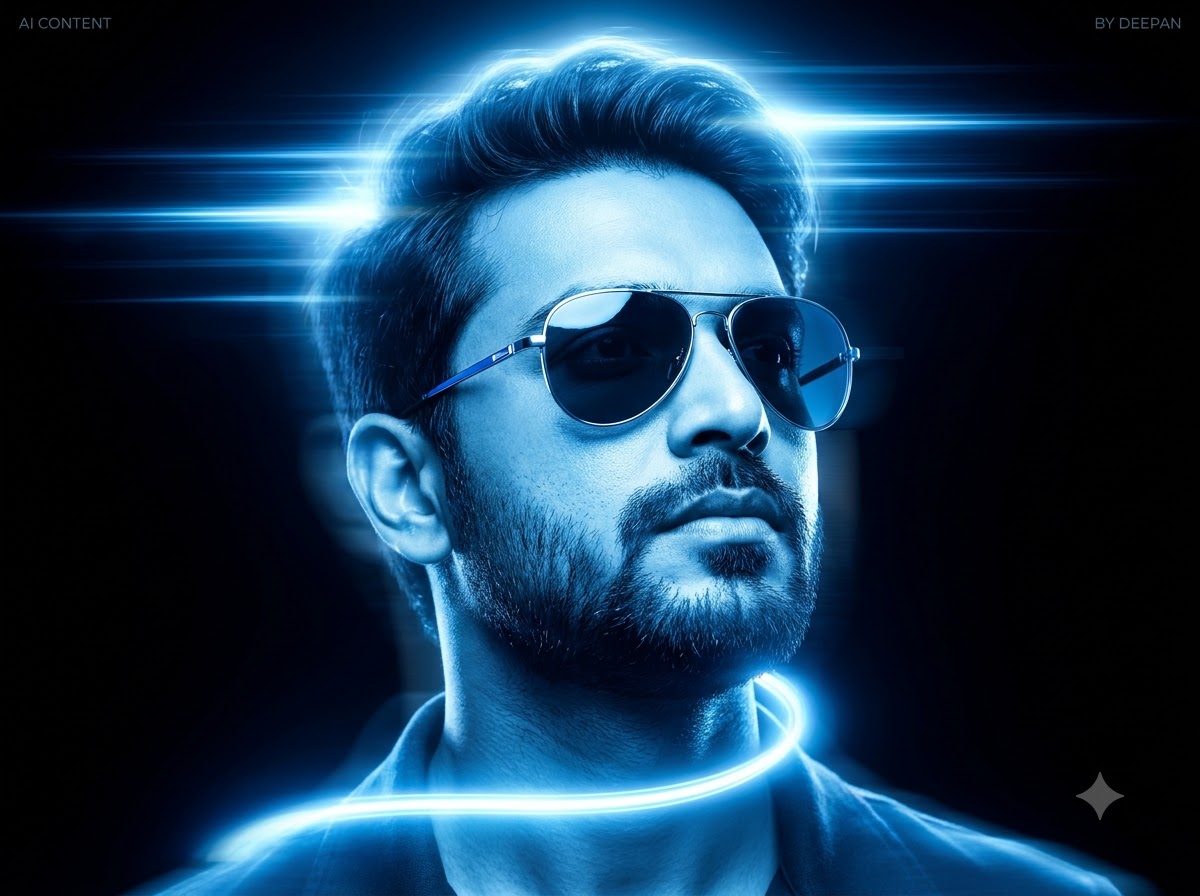
**Prompt: Hyperrealistic Electric Blue Energy Portrait — Face Reference Preservation**

I have uploaded three reference photographs of my face from different angles. Use all three reference images together to reconstruct my facial identity as accurately as possible. Preserve my actual facial structure, eye shape, nose, lips, jawline, hairstyle, facial hair, skin texture, and natural proportions. Do not replace my face with a generic AI-generated face.

Transform me into a dramatic, futuristic electric-blue light portrait against a completely black background.

**Subject and pose:** A cinematic close-up portrait of an adult man wearing classic silver aviator sunglasses with dark reflective lenses. His head is tilted slightly upward, turned subtly toward the right, with a calm, confident, serious expression. Preserve my original hairstyle and facial hair from the reference photos. Frame the image from the upper chest to slightly above the head.

**Electric-blue lighting effect:** Render my entire face, hair, beard, neck, and shoulders in a cool electric-blue monochromatic color palette. Do not use warm skin tones. Create an intense glowing blue-white light source around the crown of my head, forming luminous energy-like streaks that radiate outward horizontally in both directions.

Add multiple thin, horizontal blue laser-like light trails across the background and around the sides of my head. Integrate subtle motion-blur streaks through the hair and around the silhouette, creating the appearance of high-speed energy movement. Keep my facial features clearly recognizable beneath the blue illumination.

**Glowing neckline:** Create a bright, continuous electric-blue and white luminous band wrapping around the base of my neck and collar area. The band should emit a powerful glow, illuminating the underside of my jaw, neck, shoulders, and upper chest. Add soft blue rim lighting around the shoulders and hair edges.

**Sunglasses:** Realistic metallic silver aviator frames with precise reflections, dark lenses, accurate proportions, and subtle blue highlights. Keep the sunglasses naturally fitted to the face.

**Background:** Pure deep black, without scenery, objects, gradients that become gray, or distracting elements. The blue-white light trails should stand out dramatically against the black background.

**Color grading:** Strict monochromatic electric blue, cobalt blue, ultramarine, cyan-blue highlights, and brilliant white-blue energy. Eliminate orange, red, yellow, green, and natural warm skin colors.

**Photography style:** Premium cinematic portrait photography, futuristic sci-fi editorial, volumetric glow, long-exposure light painting, realistic facial anatomy, sharp facial details, dramatic contrast, controlled bloom, subtle atmospheric haze, high dynamic range, professional retouching, ultra-detailed 8K finish.

**Composition:** Centered vertical portrait, 9:16 aspect ratio, head and shoulders visible, generous black negative space above the subject, face occupying the central portion of the frame. Use sharp facial detail with motion blur confined primarily to the surrounding light trails.

**Optional poster text:** Add small white text reading “AI CONTENT” in the top-left corner and “BY DEEPAN” in the top-right corner. Keep all typography minimal and unobtrusive.

**Negative prompt:** Different person, generic face, altered identity, changed jawline, changed nose, changed eye shape, different hairstyle, missing beard, distorted sunglasses, asymmetrical facial features, deformed anatomy, extra limbs, warm skin tones, orange lighting, red lighting, colorful rainbow effects, gray background, excessive blur on the face, plastic skin, cartoon, illustration, low resolution, watermark, misspelled text.
How to Use This Prompt in Google Gemini & ChatGPT
- Copy the exact prompt formula above.
- Open Google Gemini (Nano Banana Pro) or ChatGPT Vision and upload your reference portrait if required.
- Paste the prompt and adjust subject clothing or lighting details as desired.