KOKOSHNIK CINEMATIC PORTRAIT
Category: Portraits | Optimized For: ChatGPT | Aspect Ratio: 4:5
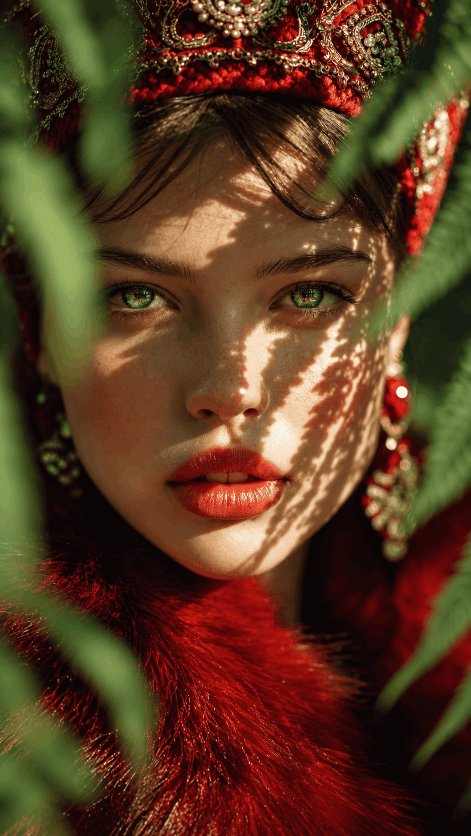
Copy-Paste AI Photo Editing Prompt
**USE THE UPLOADED IMAGE AS THE PRIMARY AND STRICT VISUAL REFERENCE. THIS IS NOT A CREATIVE INTERPRETATION. RECREATE THE PHOTOGRAPHIC APPEARANCE OF THE REFERENCE IMAGE AS CLOSELY AS POSSIBLE.**

Do **not** redesign the composition.

Do **not** create a generic Russian portrait.

Do **not** change the camera angle.

Do **not** change the face position.

Do **not** change the crop.

Do **not** change the lighting pattern.

Do **not** change the headdress proportions.

The uploaded image must control the visual composition.

---

## 1. COMPOSITION LOCK

Match the reference image's:

- exact aspect ratio
- exact crop
- camera distance
- camera height
- camera angle
- head position
- face size
- face orientation
- shoulder position
- headdress position
- foreground foliage placement
- background blur
- amount of visible clothing
- amount of empty space

**The subject must occupy the same percentage of the frame as the reference.**

If the reference is an extreme close-up, keep it an extreme close-up.

**Do not generate a wider portrait.**

---

## 2. FACE POSITION LOCK

The face must remain in the **exact same location and orientation as the reference**.

Preserve:

- forehead position
- eye position
- nose position
- mouth position
- chin position
- jawline
- cheek placement
- head tilt

The subject must look in the **same direction as the reference**.

Do not automatically make the woman look directly into the camera if the reference shows a different gaze.

---

## 3. HEADDRESS — MATCH THE REFERENCE

The kokoshnik must be treated as a **specific visual object from the reference**, not a generic Russian headdress.

Match:

- overall silhouette
- height
- width
- curvature
- side extensions
- forehead opening
- decorative arrangement
- fabric structure
- embroidery density
- jewelry placement
- pearl placement
- gemstone placement
- gold ornamentation

**Do not invent a completely different kokoshnik.**

If the reference headdress occupies 30% of the upper frame, reproduce approximately that same proportion.

---

## 4. FACE IDENTITY

If a separate identity image is provided:

**Use the separate image ONLY for facial identity.**

Use the uploaded reference image for:

**composition + lighting + styling + camera + environment + color + pose.**

Preserve the identity reference's:

- eyes
- nose
- lips
- jaw
- cheekbones
- face shape
- eyebrows
- natural proportions

Do not beautify the face into a generic AI model.

---

# 5. LIGHTING MUST MATCH THE REFERENCE

Do not use generic studio lighting.

Analyze the uploaded reference and reproduce the **same lighting direction**.

If the reference has sunlight coming through leaves:

Create real sunlight passing through foliage.

The shadows must appear in the **same general locations** as the reference:

- forehead
- eyebrows
- eyelids
- cheeks
- nose
- lips
- chin

The leaf shadows must have:

- irregular organic shapes
- realistic softness
- natural transparency
- realistic brightness variation

**Do not generate decorative leaf patterns.**

They must look physically cast by real foliage.

---

# 6. FOREGROUND FOLIAGE

Match the reference's foliage placement.

Do not simply add random leaves.

Reproduce approximately:

- left-side foliage
- right-side foliage
- top foliage
- foreground obstruction
- depth
- blur intensity

Some foliage should be extremely close to the camera and heavily blurred if that is present in the reference.

The face remains the primary focal point.

---

# 7. COLOR MATCH

Sample the overall visual feeling from the reference.

Do not impose a new color palette.

Preserve the reference's:

- green intensity
- red intensity
- skin tone
- shadow color
- highlight color
- background color
- contrast
- saturation

The image should look like the **same photograph recreated**, not a different photograph using similar colors.

---

# 8. DEPTH OF FIELD

Match the reference's focus hierarchy.

If the eyes are sharp:

**eyes = sharpest**

If the headdress is slightly softer:

**headdress = slightly softer**

If foreground leaves are blurred:

**foreground leaves = heavily blurred**

Background should have the same approximate blur level as the reference.

Do not make everything artificially sharp.

---

# 9. CAMERA MATCH

Infer the camera characteristics from the reference and reproduce them.

Maintain:

- same perspective
- same focal-length appearance
- same compression
- same distortion
- same depth
- same framing

Do not automatically use an 85mm lens if it changes the composition.

**Composition accuracy is more important than specifying a lens.**

---

# 10. PHOTOGRAPHIC REALISM

The final result must look like a real photograph.

Use:

- realistic pores
- natural skin variation
- realistic eyes
- natural eyelashes
- realistic hair strands
- physically accurate shadows
- realistic fabric
- realistic embroidery
- realistic jewelry
- natural optical bokeh
- subtle film grain
- realistic highlight roll-off

Avoid:

- plastic skin
- CGI appearance
- overly perfect symmetry
- beauty-filter skin
- fantasy illustration
- 3D-render appearance
- excessive HDR
- excessive sharpening

---

# 11. MOST IMPORTANT RULE

### REFERENCE IMAGE HAS PRIORITY OVER THE WRITTEN DESCRIPTION.

If the written prompt says one thing but the reference image visually shows something different:

**FOLLOW THE IMAGE.**

Do not invent missing details.

Do not "improve" the composition.

Do not modernize the costume.

Do not change the pose.

Do not change the facial expression.

Do not change the camera angle.

Do not change the lighting.

---

# 12. REMOVE ALL ORIGINAL GRAPHICS

Remove completely:

- text
- title
- captions
- usernames
- Telegram handles
- logos
- watermarks
- borders
- poster layout
- graphic elements

**Reconstruct only the underlying photograph.**

---

## FINAL COMMAND FOR GEMINI

**Recreate the uploaded reference photograph as an image-to-image transformation. Preserve the exact visual composition, crop, subject scale, facial orientation, head position, headdress geometry, clothing placement, foliage arrangement, lighting direction, leaf-shadow pattern, depth of field, color grading, atmospheric softness, and photographic perspective. Do not reinterpret the image or create a generic version of the concept. The result should look like the same photograph was professionally recreated with a different/controlled subject identity. Remove every piece of text and graphic design from the reference. Output ONLY the clean photorealistic photograph.**

### Important

If you want **true 1:1 matching**, upload the **actual kokoshnik reference image** to Gemini along with this prompt. A written description alone cannot tell Gemini the exact geometry, crop, facial position, shadow locations, or headdress shape.@Create image
How to Use This Prompt in Google Gemini & ChatGPT
- Copy the exact prompt formula above.
- Open Google Gemini (Nano Banana Pro) or ChatGPT Vision and upload your reference portrait if required.
- Paste the prompt and adjust subject clothing or lighting details as desired.