KEYHOLE CINEMATIC PORTRAIT — LUXURY EDITORIAL
Category: Portraits | Optimized For: Google Gemini | Aspect Ratio: 4:5
Copy-Paste AI Photo Editing Prompt
**Use the uploaded image as the PRIMARY and STRICT VISUAL REFERENCE. Recreate the underlying photograph and composition as closely as possible. Do not redesign, reinterpret, modernize, or turn it into a generic fashion photograph. The uploaded image controls the framing, keyhole shape, subject position, pose, lighting, architecture, shadows, proportions, color palette, depth, and atmosphere.**

## CORE CONCEPT

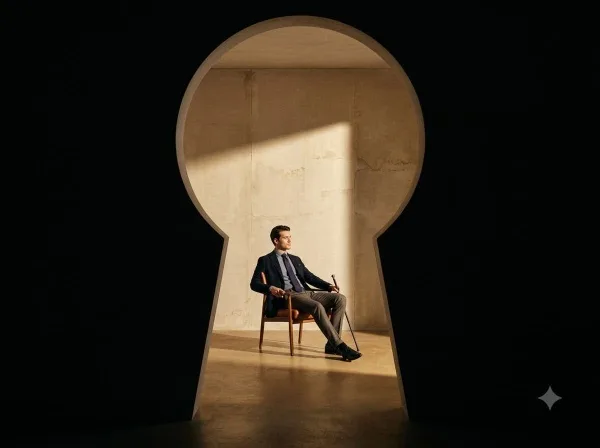
Create an **ultra-photorealistic cinematic editorial photograph of a formally dressed young adult man sitting alone on a wooden chair, viewed through a large architectural keyhole-shaped opening in an otherwise completely black environment.**

The keyhole-shaped opening is the dominant visual element.

The composition must feel like a **luxury fashion campaign / mysterious editorial campaign photograph** with dramatic warm architectural lighting.

---

# 1. COMPOSITION — STRICTLY MATCH THE REFERENCE

Use a **vertical 4:5 portrait composition**.

The frame should be overwhelmingly black.

In the center of the black frame is one large **keyhole-shaped architectural opening**.

The keyhole consists of:

- Large rounded circular top
- Narrow vertical neck
- Wider lower opening
- Smooth symmetrical outer silhouette
- Warm illuminated interior

The keyhole opening occupies approximately the **central 60–70% of the frame height**.

Leave substantial pure black negative space around it.

### IMPORTANT

The keyhole must NOT become:

- a normal doorway
- an arch
- a tunnel
- an oval
- a spotlight
- a random circular vignette

It must unmistakably resemble a **large architectural keyhole silhouette**.

---

# 2. KEYHOLE ARCHITECTURE

Inside the keyhole is a minimal architectural room.

Use:

- Warm beige concrete/plaster walls
- Slightly aged architectural texture
- Vertical wall surface
- Subtle seams and imperfections
- Warm matte floor
- Minimal interior decoration

The interior should look like a **quiet brutalist/editorial studio space**.

The outside of the keyhole remains **deep black**.

The boundary between black exterior and illuminated interior must be extremely clean and recognizable.

---

# 3. MAN — POSITION & SCALE

Place **one young adult man** sitting on a chair inside the keyhole.

His body should occupy only the **lower-middle portion of the keyhole**.

He should appear relatively small compared with the massive architectural opening.

This scale relationship is extremely important.

**Do NOT enlarge the man.**

**Do NOT make him fill the frame.**

He should look almost like a miniature fashion subject inside a monumental keyhole-shaped room.

---

# 4. POSE — MATCH THE REFERENCE

The man is seated casually and confidently.

Recreate:

- Body leaning slightly backward
- Torso relaxed
- Head turned toward the right side of the image
- Face in side/three-quarter profile
- One hand resting naturally near his thigh
- Other hand holding/resting against a dark vertical object beside the chair
- Legs extended diagonally toward the lower-left
- Feet positioned close to the bottom-left area
- Relaxed but controlled posture

The pose should feel **effortlessly confident**, not like a formal sitting portrait.

Do not make him stand.

Do not cross his legs differently.

Do not make him face the camera directly.

---

# 5. CLOTHING

Recreate the formal vintage-inspired outfit:

### Upper body
- Dark navy/black tailored blazer
- Light blue-gray dress shirt
- Dark purple/eggplant necktie
- Formal fitted silhouette

### Lower body
- Gray/brown tailored trousers
- Slightly relaxed drape
- Natural fabric folds

### Shoes
- Dark formal shoes
- Mostly visible around the lower-left portion

The clothing should have realistic fabric texture and natural wrinkles.

Do not introduce modern streetwear.

Do not add bright colors.

---

# 6. CHAIR

The man sits on a simple **wooden/cognac-brown chair**.

Recreate:

- Brown wooden frame
- Warm leather/fabric seat
- Straight vertical legs
- Minimal classic design
- Natural shadows beneath the chair

The chair should remain clearly visible but subordinate to the keyhole composition.

---

# 7. VERTICAL OBJECT BESIDE MAN

There is a dark vertical object beside the man's right hand.

Preserve this visual element and its approximate position.

It should appear like a:

**dark walking cane / slender vertical chair-side object**

with a simple handle near the man's hand.

Do not make it oversized.

Do not turn it into a weapon.

---

# 8. LIGHTING — CRITICAL

The lighting is the defining feature.

Use **strong warm directional sunlight entering the keyhole interior from the upper-left/front-left.**

Create:

- Warm golden illumination
- Strong architectural shadow
- Long diagonal shadow across the rear wall
- Bright patch of sunlight behind/above the man
- Warm light across the floor
- Deep shadows around the man's body
- Soft rim lighting around his silhouette

The light must feel like **real sunlight passing through an architectural opening**, not a studio spotlight.

---

# 9. DIAGONAL SHADOW

This is a major visual feature.

Create a strong diagonal architectural shadow across the illuminated wall.

The shadow should:

- Start around the upper-left/central area
- Travel diagonally downward
- Cross the warm wall behind the subject
- Remain soft-edged but clearly visible

Do not remove this shadow.

Do not replace it with random window shadows.

Do not create multiple dramatic light beams.

---

# 10. FLOOR LIGHT

The lower part of the keyhole should contain a warm pool of sunlight.

Create:

- Golden illuminated floor
- Soft gradient toward darkness
- Subtle floor texture
- Long soft shadows from chair legs
- Natural contact shadows beneath the man's feet

The floor should gradually become darker toward the bottom.

---

# 11. COLOR PALETTE

Use the exact visual family of the reference:

### Dominant colors
- Deep black
- Warm charcoal
- Dark brown
- Antique beige
- Warm tan
- Muted gold
- Cognac brown

### Accent
- Dark navy blazer
- Muted purple tie
- Warm skin tones

Avoid:

- teal
- cyan
- neon
- bright red
- saturated orange
- modern colorful grading

The image should have a **warm luxury editorial / vintage cinematic color grade**.

---

# 12. BLACK NEGATIVE SPACE

The black surrounding the keyhole must be **extremely dark**.

Use:

- near-black background
- subtle tonal variation only where necessary
- no visible studio wall
- no visible room outside the keyhole
- no objects outside the keyhole

The black area should visually isolate the keyhole.

This negative space is essential.

---

# 13. CAMERA & LENS

Use a professional cinematic portrait setup:

- Full-frame camera
- Approximately 70–85mm lens
- Natural perspective
- Slightly elevated or eye-level viewpoint
- No wide-angle distortion
- High-resolution photographic detail
- Moderate depth of field

The entire keyhole should remain recognizable and relatively sharp.

The man should have enough detail to remain photorealistic despite being relatively small in the frame.

---

# 14. TEXTURE & MATERIAL REALISM

Make all surfaces physically believable:

### Wall
- aged plaster/concrete
- subtle stains
- fine texture
- slight imperfections

### Floor
- matte warm concrete
- subtle grain
- realistic light falloff

### Clothing
- visible fabric weave
- natural folds

### Chair
- realistic wood/leather texture

### Skin
- natural pores
- realistic facial texture
- no plastic smoothing

---

# 15. ATMOSPHERE

The image should feel:

**mysterious + sophisticated + quiet + luxurious + cinematic + editorial.**

There should be a feeling of isolation.

The huge keyhole architecture should make the man appear small and visually isolated.

Do not make the scene cheerful.

Do not make it horror.

Do not make it fantasy.

Keep it grounded in **real photographic architecture**.

---

# 16. PHOTOGRAPHIC FINISH

Use a premium cinematic editorial finish:

- subtle 35mm film grain
- soft highlight roll-off
- realistic shadow detail
- slight lens diffusion
- gentle atmospheric softness
- natural skin texture
- controlled contrast
- warm filmic highlights

Avoid excessive HDR.

Avoid hyper-sharp digital rendering.

Avoid excessive clarity.

---

# 17. REMOVE ALL GRAPHICS FROM REFERENCE

The uploaded reference contains typography.

**Do NOT reproduce any of the following:**

- "NEW COLLECTION"
- "COMING SOON"
- decorative line
- any text
- logos
- branding
- graphic overlays

Generate **only the underlying photograph**.

---

# STRICT NEGATIVE PROMPT

**NO text**

**NO typography**

**NO logo**

**NO watermark**

**NO graphic design**

**NO poster layout**

**NO extra people**

**NO extra chairs**

**NO modern furniture**

**NO colorful background**

**NO neon**

**NO visible studio**

**NO doorway**

**NO normal arch**

**NO tunnel**

**NO circular spotlight**

**NO random vignette**

**NO distorted keyhole**

**NO wide-angle distortion**

**NO giant man**

**NO standing man**

**NO frontal pose**

**NO different pose**

**NO modern clothing**

**NO CGI**

**NO 3D render**

**NO illustration**

**NO cartoon**

**NO artificial textures**

**NO excessive HDR**

**NO plastic skin**

---

# FINAL MASTER INSTRUCTION

**The uploaded reference is the MASTER VISUAL BLUEPRINT.**

Recreate the same:

**KEYHOLE SILHOUETTE → BLACK NEGATIVE SPACE → WARM ARCHITECTURAL INTERIOR → SMALL SEATED MAN → CHAIR → DIAGONAL SUNLIGHT → LONG WALL SHADOW → WARM FLOOR LIGHT → FORMAL CLOTHING → CINEMATIC EDITORIAL COLOR → PHOTOREALISTIC TEXTURE.**

The **keyhole must remain the dominant composition**, and the man must remain **relatively small inside it**.

Do not create a generic portrait of a man sitting on a chair.

**Create the photograph as if the camera is looking through a gigantic architectural keyhole into a warm, sunlit room.**

**OUTPUT: EXACTLY 4:5 VERTICAL, PHOTOREALISTIC, CLEAN IMAGE ONLY, NO TEXT, NO WATERMARK, NO GRAPHIC ELEMENTS.**
How to Use This Prompt in Google Gemini & ChatGPT
- Copy the exact prompt formula above.
- Open Google Gemini (Nano Banana Pro) or ChatGPT Vision and upload your reference portrait if required.
- Paste the prompt and adjust subject clothing or lighting details as desired.