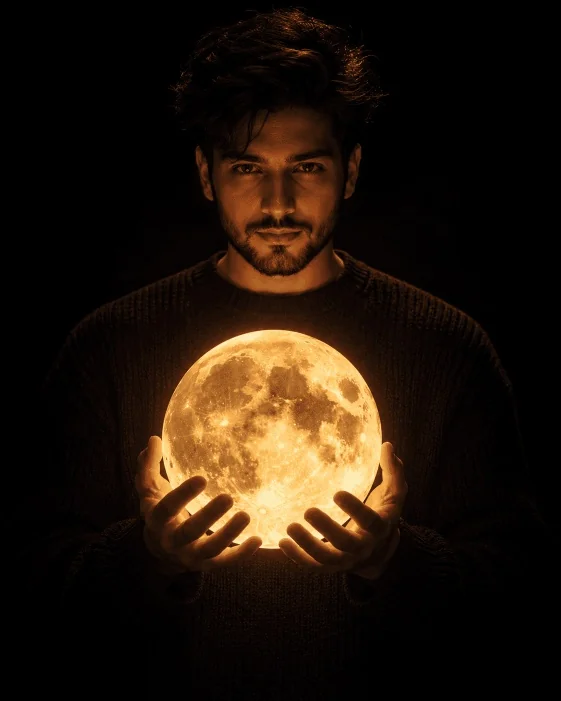
CINEMATIC MOON IN HANDS
Category: Portraits | Optimized For: ChatGPT | Aspect Ratio: 4:5
Copy-Paste AI Photo Editing Prompt
**Use the uploaded image as the PRIMARY VISUAL REFERENCE. Recreate the underlying photograph as closely as possible. Match the composition, camera angle, subject placement, pose, lighting direction, darkness, moon size, hand position, clothing, and atmospheric mood. Do not recreate any text, watermark, logo, or graphic design. Generate only the clean photograph.**

### CORE CONCEPT

Create an **ultra-photorealistic cinematic portrait of a young adult man standing alone in a completely dark studio, gently holding a glowing full moon between both hands at chest level.**

The image should feel **mysterious, spiritual, minimal, cinematic, and photographic**, with the moon acting as the primary light source.

---

## COMPOSITION — STRICTLY MATCH REFERENCE

- Vertical **4:5 composition**
- Full upper-body portrait
- Man positioned exactly in the center
- Camera directly facing the subject
- Subject looking directly into the camera
- Head positioned around the upper third
- Moon positioned directly in the center of the torso
- Both hands symmetrically positioned around the moon
- Large amount of black negative space surrounding the subject
- Lower body gradually disappears into darkness
- Do not crop the head
- Do not move the moon to either side
- Do not make the moon extremely large
- Maintain the same visual balance as the reference

---

# SUBJECT

Create a young adult man with:

- masculine facial structure
- neatly styled dark hair swept upward/back
- short well-groomed beard
- defined eyebrows
- dark eyes
- natural lips
- calm, serious expression
- direct eye contact
- realistic facial proportions

The expression should be **quiet, mysterious, and contemplative**.

No smile.

No exaggerated emotion.

---

# CLOTHING

The man wears a **simple black/dark charcoal knitted sweater**.

Details:

- high or round neckline
- subtle knitted texture
- loose natural folds
- almost completely blending into the black background
- only the areas illuminated by the moon should become visible

Do not add jewelry, patterns, logos, or accessories.

---

# MOON — MOST IMPORTANT ELEMENT

The man is holding a **realistic full moon** between both hands.

The moon should:

- be perfectly round
- appear approximately the same size as the reference
- sit at the center of his chest
- have highly detailed lunar craters
- contain realistic maria and surface variations
- have warm golden/amber illumination
- emit a subtle natural glow
- remain photographic rather than fantasy-like

### Moon texture

Include extremely detailed:

- craters
- mountains
- dark lunar plains
- rough surface
- subtle tonal variations
- realistic spherical shading

The moon must look like a **real astronomical object**, not a glowing ball or light bulb.

Do not add an artificial halo around the entire moon.

---

# HAND POSITION — CRITICAL

Both hands gently cradle the moon from underneath and slightly around its sides.

Match the reference arrangement:

### LEFT HAND

- enters from the lower-left
- palm facing upward/inward
- fingers curved naturally around the moon
- fingertips visible against the moonlight

### RIGHT HAND

- enters from the lower-right
- mirrored supportive position
- palm facing upward/inward
- fingers naturally curved

The hands should appear to **physically hold the spherical moon**.

Important:

- realistic finger anatomy
- five fingers per hand
- natural joints
- realistic nails
- correct finger overlap
- believable contact with the moon
- no extra fingers
- no fused fingers

---

# MOONLIGHT

The moon itself acts as the primary illumination.

Create warm **golden-orange light** radiating naturally onto:

- fingertips
- palms
- wrists
- lower face
- beard
- lower sweater
- underside of chin

The strongest illumination should occur around the hands.

The face should remain mostly dark with subtle warm highlights.

---

# FACE LIGHTING

Use extremely controlled low-key lighting.

The upper face should remain predominantly shadowed.

Visible areas:

- forehead: subtle warm highlight
- nose: very subtle warm highlight
- cheeks: mostly dark
- lips: slight warm reflection
- beard: subtle amber rim
- eyes: small natural catchlights

Do not brightly illuminate the entire face.

The contrast between the dark face and glowing moon is essential.

---

# BACKGROUND

The background must be **almost completely black**.

No visible environment.

No stars.

No galaxy.

No clouds.

No room.

No objects.

No gradient.

Only a very subtle separation around the subject caused by the moonlight.

The image should feel like the subject is emerging from complete darkness.

---

# LIGHTING STYLE

Use **extreme low-key cinematic lighting**.

Lighting hierarchy:

**1. Moon → strongest light**

**2. Hands → bright warm illumination**

**3. Lower face/beard → subtle warm illumination**

**4. Sweater → extremely subtle visibility**

**5. Background → almost pure black**

Avoid studio key lights that reveal the entire subject.

---

# CAMERA

Simulate a professional full-frame portrait camera.

- 50mm–85mm lens aesthetic
- Eye-level camera
- Straight-on perspective
- Medium portrait framing
- Natural perspective
- No wide-angle distortion
- Shallow depth of field
- Face and moon sharply detailed
- Background completely out of focus / invisible

---

# COLOR PALETTE

Use a restrained cinematic palette:

**Black + deep charcoal + warm amber + golden moonlight**

No:

- blue
- cyan
- purple
- neon colors
- green
- colorful background

The image should have a warm monochromatic appearance against deep black.

---

# REALISM

Make the image look like a **real professional cinematic photograph**.

Include:

- realistic skin pores
- realistic beard hairs
- individual hair strands
- natural eye reflections
- realistic hands
- realistic fingernails
- detailed sweater fibers
- physically accurate moonlight
- realistic shadows
- natural highlight falloff
- subtle film grain
- realistic optical rendering

Avoid:

- CGI
- illustration
- fantasy art
- plastic skin
- artificial glow
- excessive HDR
- overly smooth hands
- distorted fingers

---

# STRICT REFERENCE MATCH

**The uploaded reference controls the visual structure.**

Prioritize matching:

1. **Centered man**
2. **Direct eye contact**
3. **Black background**
4. **Dark sweater**
5. **Glowing full moon at chest level**
6. **Two hands symmetrically holding the moon**
7. **Warm moonlight illuminating the hands**
8. **Face mostly hidden in darkness**
9. **Minimal cinematic composition**
10. **Vertical portrait framing**

Do not turn this into a fantasy space scene or an astrology poster.

---

# REMOVE ALL TEXT

Do not reproduce any:

- text
- title
- caption
- logo
- watermark
- username
- typography
- border
- graphic element

**Output only the clean photograph.**

### FINAL GEMINI COMMAND

**Recreate the uploaded reference as an ultra-photorealistic cinematic photograph. Keep the exact central composition and visual hierarchy: a young adult bearded man in a black sweater stands against an almost completely black background, looking directly into the camera, while both hands gently cradle a highly detailed glowing full moon at the center of his chest. The moon is the primary light source, casting warm golden illumination onto his fingers, palms, wrists, lower beard, chin, and subtle portions of the sweater while most of his face and body remain dramatically concealed in darkness. Preserve the same moon size, hand placement, subject scale, camera perspective, negative space, and overall lighting pattern of the uploaded reference. Realistic human anatomy, realistic hands and fingers, detailed lunar craters, natural skin texture, subtle film grain, physically accurate light falloff, premium cinematic low-key photography. No text, no watermark, no logo, no poster design. Clean photograph only.**@Create image
How to Use This Prompt in Google Gemini & ChatGPT
- Copy the exact prompt formula above.
- Open Google Gemini (Nano Banana Pro) or ChatGPT Vision and upload your reference portrait if required.
- Paste the prompt and adjust subject clothing or lighting details as desired.