BURNING PROP-NOTES INDUSTRIAL PORTRAIT
Category: Portraits | Optimized For: Google Gemini | Aspect Ratio: 4:5
Copy-Paste AI Photo Editing Prompt
Use the uploaded identity image as the exact facial and physical reference for the central adult male. Preserve his recognizable facial structure, eye shape and spacing, eyebrows, nose, lips, jawline, cheek structure, skin tone, hairstyle, hairline, facial-hair pattern, apparent age, body type, and natural proportions. Preserve natural facial asymmetry and realistic skin texture. Do not replace, redesign, age, de-age, or excessively beautify his face.

Use the supplied composition reference only for the seated pose, all-black clothing, industrial environment, controlled firelight, camera framing, and symbolic atmosphere. Do not copy any visible person, identity, social-media information, typography, watermark, logo, border, or exact graphic layout from the reference.

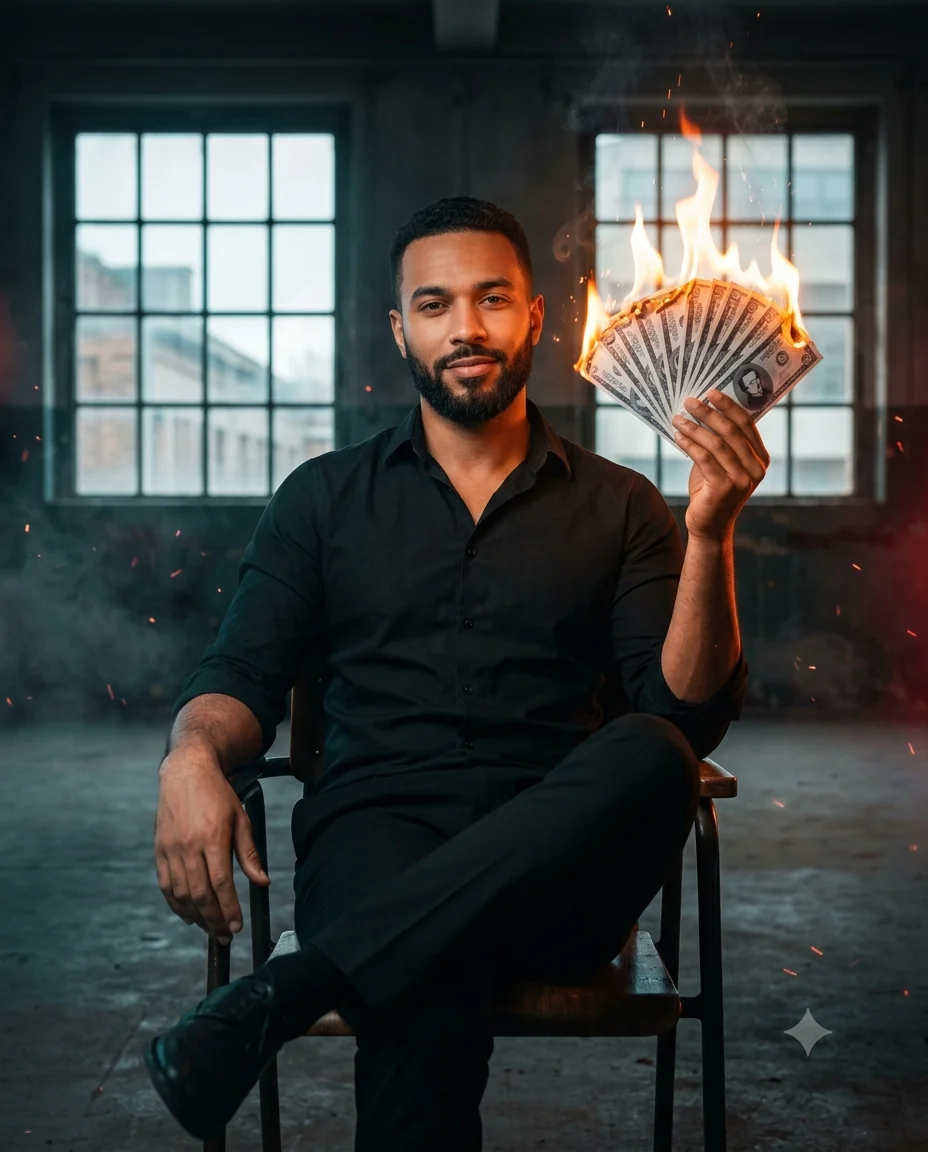
Create an ultra-realistic cinematic portrait showing the uploaded adult male sitting confidently in a dark, abandoned industrial room while holding a spread fan of burning fictional cinematic prop notes. Preserve his hairstyle and facial hair as shown in the uploaded identity image rather than replacing them with generic features.

Give him a calm, self-assured expression with a restrained half-smile and direct eye contact. Keep his face unobstructed and recognizable. Dress him in a fitted all-black outfit consisting of a black button-up shirt with the sleeves rolled naturally to his forearms, tailored black trousers, and dark unbranded shoes. Render realistic buttons, seams, cuffs, stitching, fabric texture, and natural folds.

Seat him in a simple dark wooden or metal chair. Use a relaxed but commanding pose with one leg crossed naturally over the other. Rest his left forearm comfortably on the chair’s armrest, allowing the left hand to hang naturally. Raise his right hand near shoulder height while holding a clearly visible spread fan of fictional prop notes.

Ensure believable seated anatomy, natural spinal alignment, realistic weight distribution, correct leg crossing, and accurate placement of both arms and hands. The raised hand must have one thumb and four fingers, with natural joints and a convincing grip on the notes.

FICTIONAL PROP NOTES
The notes must be unmistakably fictional theatrical props. Use invented geometric patterns, abstract fictional portraits, meaningless denominations, decorative shapes, and imaginary symbols. Avoid real currency colors and layouts where possible.

Do not reproduce or imitate any real national currency, legal tender, banknote portrait, government seal, serial number, denomination system, financial institution, official emblem, or recognizable security feature. Keep any tiny markings abstract and unreadable.

Arrange the prop notes as a clear fan held firmly between the thumb and fingers. Maintain consistent note thickness, believable paper edges, and correct overlap. Avoid duplicated note patterns, impossible bends, floating notes, or notes intersecting the fingers.

CONTROLLED FIRE EFFECT
Create a controlled theatrical flame effect rising only from the upper outer edges of the prop notes. Use bright yellow-white flame cores, rich orange flames, restrained red edges, glowing embers, small sparks, curling smoke, and subtle heat distortion.

Keep the flames visibly separated from the man’s fingers, palm, face, beard, hair, shirt, chair, and surroundings. His hand must remain completely uninjured. Do not show burned skin, damaged clothing, panic, pain, or spreading fire. The effect should read as a symbolic, professionally controlled cinematic scene rather than realistic dangerous behavior.

Use the flames as the primary warm light source. Cast realistic orange illumination across the raised hand, right side of his face, beard, shirt collar, chest, and nearby chair. Add physically convincing light falloff, moving highlights, soft fire shadows, and subtle reflections on surrounding surfaces so the flame appears integrated rather than digitally pasted on.

INDUSTRIAL ENVIRONMENT
Place the scene inside a dim industrial room with dark weathered walls, a textured concrete floor, and two large gridded windows behind the subject. Through the windows, show soft overcast daylight and indistinct exterior architecture. Keep the environment atmospheric, uncluttered, and free from flammable debris near the subject.

Introduce cool blue-gray window light from behind to create contrast with the orange firelight. Add a narrow cool rim light around his head and shoulders. Include low atmospheric haze, restrained smoke, a few floating sparks, and subtle red light leaks near the lower corners.

Frame the subject from approximately the knees upward using a centered, slightly low camera angle. Keep the uploaded man’s eyes, face, raised hand, and burning prop notes sharply focused while allowing the industrial background to fall into a soft blur.

The visual theme should communicate ambition, risk, impermanence, sacrifice, power, and detachment from material wealth without encouraging the destruction of real currency, property, or financial instruments.

Professional 50mm cinematic portrait lens, f/2.0 depth-of-field aesthetic, high dynamic range, realistic flame exposure, detailed skin pores and facial hair, accurate fabric texture, dramatic teal-and-orange grading, deep but detailed shadows, and Ultra-HD 8K photorealism.

Strong identity fidelity to the uploaded image; exactly one recognizable adult male; no identity drift, face replacement, facial redesign, celebrity transformation, real currency, legal tender, readable note details, official seals, serial numbers, financial brand names, injury, burned skin, spreading fire, background fire, weapons, drugs, extra fingers, missing fingers, malformed hands, duplicated notes, floating objects, text overlay, social-media usernames, logos, watermark, poster border, or application-interface elements. Vertical 4:5 aspect ratio.
How to Use This Prompt in Google Gemini & ChatGPT
- Copy the exact prompt formula above.
- Open Google Gemini (Nano Banana Pro) or ChatGPT Vision and upload your reference portrait if required.
- Paste the prompt and adjust subject clothing or lighting details as desired.